15 Common Google Ads Mistakes to Avoid for Better Results
- Introduction: Why Google Ads Campaigns Fail
Google Ads is one of the most effective ways for businesses to reach potential customers when they are actively searching for products or services. Whether you run a small local business, an e-commerce store, or a digital marketing agency, Google Ads can help you increase website traffic, generate qualified leads, and grow your business.
However, simply creating a campaign and setting a daily budget does not guarantee success. Moreover, many businesses spend money on Google Ads without achieving the results they expect. Some receive clicks but no enquiries, while others generate leads that never turn into customers.
Why does this happen?
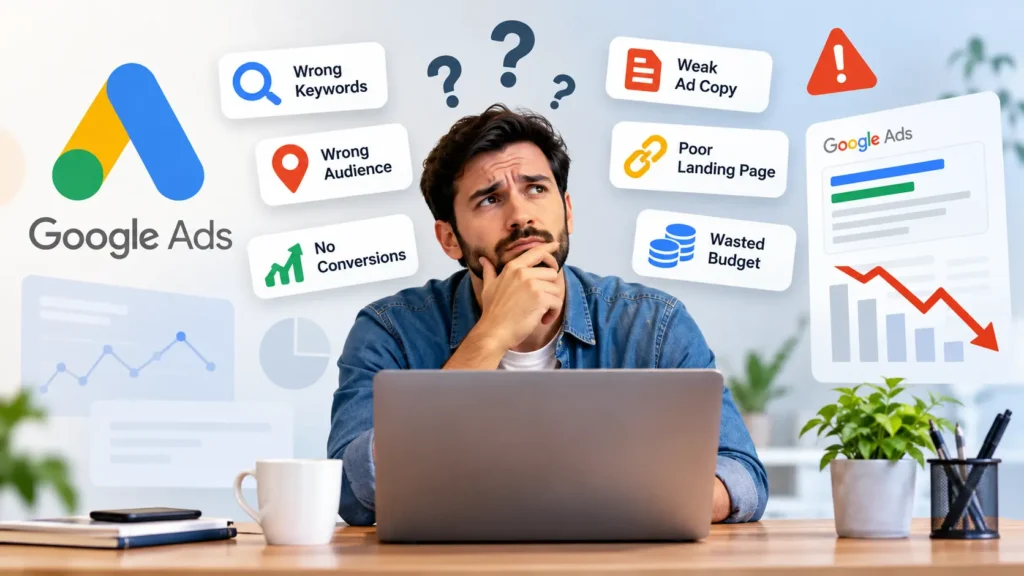
In many cases, the problem is not Google Ads itself but the way the campaign is planned, configured, and managed. Choosing irrelevant keywords, targeting the wrong audience, ignoring conversion tracking, and sending visitors to poorly designed landing pages can waste your advertising budget.
Understanding the common Google Ads mistakes businesses make is the first step toward improving campaign performance. The good news is that many of these problems can be corrected with the right strategy, regular monitoring, and continuous optimization.
In this guide, we will explore 15 common Google Ads mistakes to avoid, explain why they affect campaign performance, and share practical solutions to help you get better results from your advertising budget.
Whether you are new to Google Ads or already running campaigns, these tips can help you make more informed advertising decisions.
- 15 Common Google Ads Mistakes to Avoid
- Choosing the Wrong Keywords
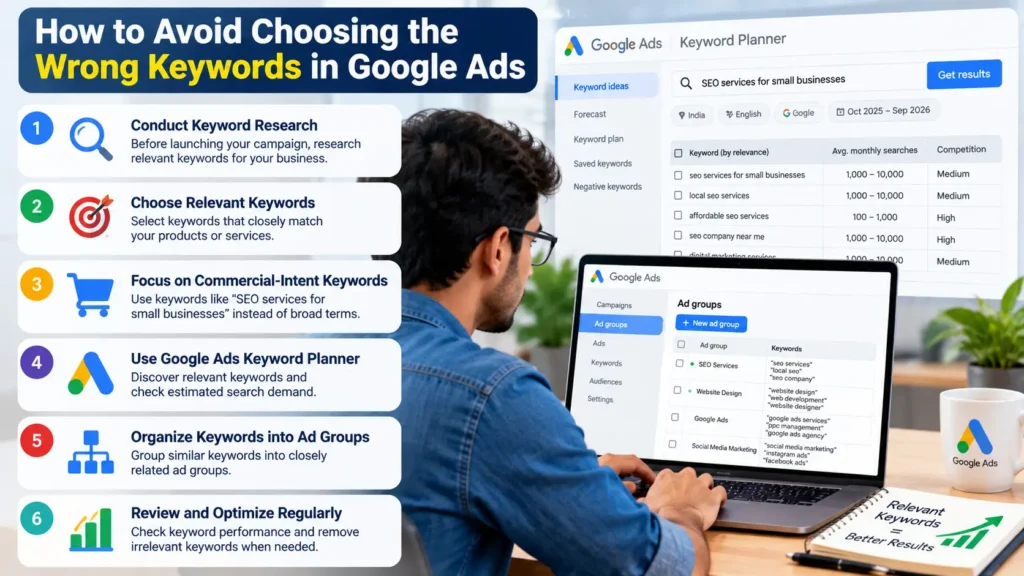
Also, keywords play an important role in Search campaigns because they help connect your advertisements with relevant searches. If you choose keywords that do not match your products or services, you may attract visitors who are unlikely to become customers.
For example, imagine that you own a digital marketing agency in Kakinada and want to attract businesses looking for SEO services. If you target a broad keyword such as “marketing,” your advertisements may reach people searching for marketing courses, jobs, definitions, or other unrelated information.
These clicks may increase your advertising costs without generating meaningful enquiries.
How to avoid this mistake:
- Conduct keyword research before launching your campaign.
- Choose keywords that closely match your products or services.
- Consider commercial-intent searches, such as “SEO services for small businesses.”
- Use the Google Ads Keyword Planner to discover relevant keywords and estimated search demand.
- Organize keywords into closely related ad groups.
- Also, review keyword performance regularly and remove irrelevant terms when appropriate.
Remember that more clicks do not automatically mean better results. Focus on attracting people who are genuinely interested in what your business offers.
- Ignoring Negative Keywords
Further, negative keywords help prevent your advertisements from appearing for certain irrelevant searches. Ignoring them can result in wasted spending, particularly when your keyword targeting is broad.
For example, a company offering paid website design services may not want to attract people searching for free website builders, website design jobs, or website design courses.
If these searches trigger your advertisements, you could pay for clicks from people who are unlikely to purchase your services.
How to avoid this mistake:
- Review the Search terms report in Google Ads.
- Identify searches that are unrelated to your business.
- Add suitable negative keywords to exclude unwanted traffic.
- Create shared negative keyword lists when the same exclusions apply across multiple campaigns.
- Review negative keyword settings periodically to avoid blocking valuable searches.
Be careful when adding negative keywords because their matching behavior differs from positive keyword matching. An overly broad exclusion can prevent your advertisements from reaching relevant customers.
- Using Poor Audience and Location Targeting
Even a well-written advertisement can perform poorly if it reaches the wrong people.
Location targeting is particularly important for businesses serving specific cities or regions. For example, a local business in Kakinada may primarily want enquiries from customers in Kakinada and nearby serviceable areas rather than from unrelated locations across India.
Similarly, a business selling premium services may need to refine its audience strategy based on customer intent, demographics where relevant, and actual campaign data.
How to avoid this mistake:
- Select locations that match your service area.
- Review the location options available in your campaign settings.
- Understand the difference between people physically present in a location and people who show interest in it.
- Check the geographic performance report to identify where clicks and conversions originate.
- Use audience segments as observation or targeting signals according to your campaign type and objective.
- Adjust targeting based on actual customer and conversion data.
For a local business, accurate targeting can help reduce irrelevant clicks and improve the chances of receiving enquiries from potential customers.
- Sending Traffic to the Homepage Instead of a Relevant Landing Page
Imagine clicking an advertisement for Google Ads management services and landing on a website homepage that discusses website design, social media marketing, email marketing, and several other services.
You might struggle to find the exact service mentioned in the advertisement. If the information is difficult to locate, you may leave the website without contacting the business.
This is why sending every advertisement to the homepage can be a costly mistake.
A relevant landing page gives visitors the information they expect after clicking your advertisement.
How to avoid this mistake:
- Create dedicated landing pages for important products and services.
- Match the landing page headline with the advertisement’s message.
- Explain your service benefits clearly.
- Include a visible call to action, such as “Request a Free Consultation” or “Get a Quote.”
- Display trustworthy business information, testimonials, and relevant contact details.
- Make forms simple and easy to complete.
For example, if your advertisement promotes SEO services, direct visitors to your SEO services page instead of asking them to search through your entire website.
Also, a relevant landing page can improve the visitor experience and help turn qualified traffic into enquiries.
- Writing Weak Ad Copy
Your advertisement is often the first interaction a potential customer has with your business. If the message is unclear, generic, or unrelated to the search, people may choose a competitor instead.
An advertisement that says only “Best Services Available” does not explain what the business offers or why someone should choose it.
Effective ad copy communicates relevance, value, and a clear next step.
How to avoid this mistake:
- Write headlines that reflect the customer’s search intent.
- Highlight genuine benefits and differentiators.
- Include relevant keywords naturally.
- Use clear calls to action.
- Address customer problems rather than listing features alone.
- Test different headline and description combinations.
- Avoid unsupported claims, misleading offers, and exaggerated guarantees.
For example, a digital marketing agency might use a message such as “SEO Services for Growing Businesses” followed by a description explaining its services and inviting potential customers to request a consultation.
Further, the goal is not simply to get attention. It is to attract the right people and set accurate expectations before they click.
- Ignoring Conversion Tracking
One of the most serious Google Ads mistakes is running campaigns without reliable conversion tracking.
Clicks and impressions show how people interact with your advertisements, but they do not tell you whether those interactions generate business results.
A campaign may receive hundreds of clicks while producing very few enquiries. Without conversion tracking, it becomes difficult to identify which keywords, advertisements, or campaigns are contributing to your goals.
How to avoid this mistake:
- Moreover, define your primary business goals before launching a campaign.
- Set up Google Ads conversion tracking or an appropriate Google Analytics integration.
- Track meaningful actions, such as completed lead forms, purchases, or qualified enquiry submissions.
- Test whether conversions are recorded correctly.
- Avoid counting duplicate actions as separate conversions.
- Import offline conversion data when appropriate and technically feasible.
- Distinguish valuable leads from low-quality enquiries.
- For a service business, a completed enquiry form may be a useful conversion. For an online store, a completed purchase is usually more meaningful than a product-page visit.
Accurate conversion data helps you evaluate performance and make better bidding and budget decisions.
- Setting an Unrealistic Budget
Your advertising budget should reflect your business goals, competition, expected customer acquisition costs, and available resources.
Setting a very small budget in a competitive market may limit how much useful data you collect. On the other hand, spending too much before validating your campaign can expose your business to unnecessary financial risk.
There is no single budget that works for every business.
How to avoid this mistake:
- Moreover, start with a budget you can afford to test and manage.
- Estimate potential costs using keyword research and available campaign forecasts.
- Identify how many leads or sales you need to achieve your business goals.
- Monitor cost per conversion rather than focusing only on total clicks.
- Allocate more budget to campaigns that demonstrate sustainable performance.
- Review your actual spending and business results regularly.
For example, a local service provider may begin with a controlled daily budget, test relevant keywords, and evaluate lead quality before increasing spending.
Remember that a higher budget does not automatically produce better results. Your targeting, landing page, offer, and conversion tracking also matter.
- Choosing the Wrong Bidding Strategy
Google Ads offers different bidding strategies designed for different objectives. Selecting a strategy without understanding your campaign goal can make optimization more difficult.
For example, maximizing clicks focuses on obtaining clicks within your budget, whereas conversion-focused strategies aim to generate conversions based on the campaign’s setup and available data.
If your main objective is qualified leads, choosing a bidding strategy solely to increase website traffic may not align with your business goals.
How to avoid this mistake:
- Further, define whether your campaign is designed for traffic, leads, sales, or another objective.
- Understand how each available bidding strategy works.
- Ensure conversion tracking is reliable before relying on conversion-based optimization.
- Use an appropriate initial strategy for your campaign’s maturity and data availability.
- Review campaign performance before making significant bidding changes.
- Avoid changing bidding strategies repeatedly without sufficient evidence.
- Automated bidding can be useful, but it depends on campaign configuration, conversion signals, and the goal you want to achieve.
Choose a strategy that supports your actual business objective instead of selecting one simply because it is popular.
- Ignoring Search Terms Reports
Your selected keywords and the actual searches that trigger your advertisements are not always identical.
The Search terms report helps you understand the search queries associated with your ads. Ignoring this report means you may miss opportunities to discover relevant searches or exclude unwanted traffic.
For example, a website design company may discover that its ads are appearing for searches related to website design tutorials or employment opportunities.
At the same time, the report may reveal valuable commercial searches that deserve closer attention.
how to avoid this mistake:
- Review the Search terms report regularly.
- Identify irrelevant queries and add appropriate negative keywords.
- Look for relevant searches that could inform your keyword strategy.
- Examine the relationship between search terms, clicks, and conversions.
- Use the findings to improve advertisements and landing pages.
Remember that Google may not report every search query, particularly where privacy thresholds apply.
This simple habit can help you understand what potential customers are actually looking for and make your targeting more efficient.
- Not Using Relevant Ad Assets
Ad assets, previously known as ad extensions, can provide additional information alongside your advertisements.
Depending on eligibility and campaign configuration, these may include sitelinks, callouts, structured snippets, phone numbers, images, and other relevant information.
Ignoring suitable assets can mean missing opportunities to make your advertisements more informative and useful.
For example, a digital marketing agency could use sitelinks to direct customers to its SEO, website design, and Google Ads management pages.
How to avoid this mistake:
- Also, add relevant sitelink assets.
- Use callouts to highlight genuine benefits.
- Include structured snippets where appropriate.
- Add a phone number when phone enquiries are an important business goal.
- Moreover, use suitable image assets when eligible.
- Keep all asset information accurate and consistent with your landing pages.
- Review asset performance and eligibility periodically.
Not every asset will appear in every auction. Google determines which eligible combinations to display based on several factors.
The objective is to give potential customers useful information that supports their decision to engage with your business.
- Failing to Optimize Landing Pages for Mobile
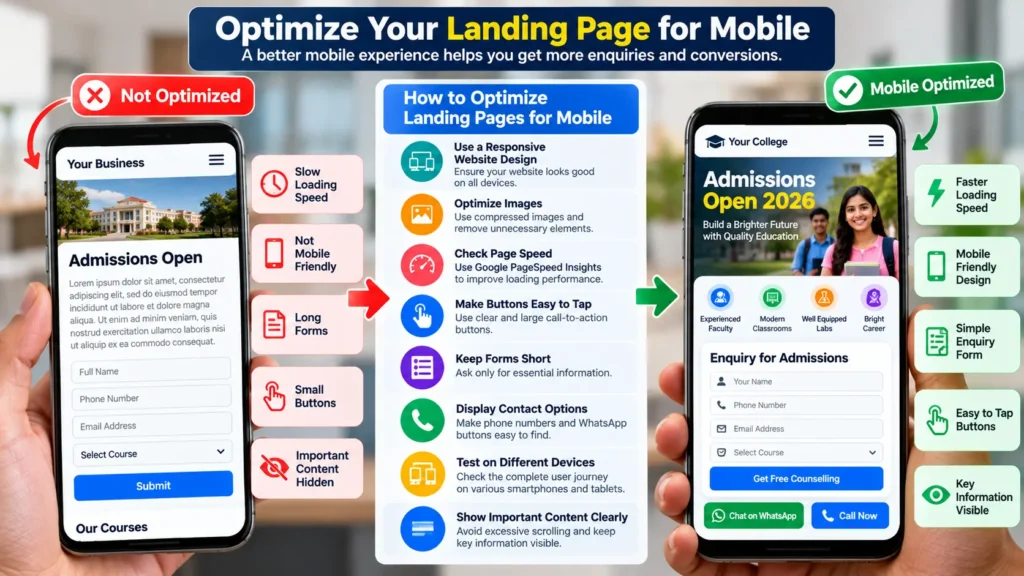
Many customers browse websites and contact businesses using smartphones. If your landing page loads slowly, displays poorly, or contains difficult-to-use forms, visitors may leave before completing an enquiry.
A mobile-friendly advertisement is not enough if the website experience is frustrating.
For example, a customer who clicks an advertisement for a local college may abandon the page if the admission enquiry form is too small, difficult to navigate, or slow to load.
How to avoid this mistake:
- Use a responsive website design.
- Optimize images and reduce unnecessary page elements.
- Moreover, check loading performance using PageSpeed Insights.
- Ensure buttons and links are easy to tap.
- Keep forms short and straightforward.
- Make phone numbers and contact options easy to find.
- Test the complete conversion process on different mobile devices.
- Check that important content appears correctly without excessive scrolling.
Moreover, mobile optimization improves usability and can help visitors complete the actions that matter to your business.
- Ignoring Quality Score
Quality Score is a diagnostic tool used in Google Ads Search campaigns to help advertisers understand the quality of their keywords relative to other advertisers.
It is based on three main components: expected click-through rate, ad relevance, and landing page experience.
Ignoring these factors may make it harder to identify why certain keywords are performing poorly.
However, it is important to understand that Quality Score is not itself a direct auction-time input. Google uses real-time auction factors to determine Ad Rank, and the displayed Quality Score is a diagnostic measure rather than a complete explanation of campaign performance.
How to avoid this mistake:
- Make sure your advertisement closely matches the user’s search intent.
- Write clear and relevant headlines.
- Improve the usefulness and navigation of your landing page.
- Make your website mobile-friendly.
- Moreover, review the available Quality Score component statuses.
- Focus on improving the customer experience instead of chasing a particular score.
A higher Quality Score is not a guarantee of lower costs or more conversions. The ultimate goal is to build relevant campaigns that serve customers effectively and support profitable business outcomes.
- Not Testing Different Ads
Assuming that your first advertisement is the best one can prevent you from discovering more effective messaging.
Different customers may respond to different benefits, offers, and calls to action. Testing helps you understand which messages work better for your audience.
For example, one advertisement might emphasize affordable pricing, while another highlights professional support or a customized solution.
How to avoid this mistake:
- Develop clear and relevant ad variations.
- Test different headlines, value propositions, and calls to action.
- Use responsive search ads where appropriate.
- Review conversions and conversion value alongside click-through rate.
- Allow enough time and data for meaningful evaluation.
- Avoid changing too many campaign elements at the same time.
- Do not judge every advertisement solely by its click-through rate. An ad that generates fewer clicks may still deliver more valuable leads or sales.
The best approach is to evaluate how each variation contributes to your business goals.
- Making Frequent Changes Without Enough Data
Moreover, when a campaign does not produce immediate results, it can be tempting to change keywords, budgets, bids, advertisements, and targeting every day.
However, making frequent changes without enough data can make performance harder to interpret. You may not know which adjustment helped or harmed the campaign.
Some changes can also affect automated bidding and campaign learning.
How to avoid this mistake:
- Establish clear performance goals before launching the campaign.
- Check for urgent technical problems regularly.
- Allow a reasonable evaluation period based on traffic volume and conversion delay.
- Make changes when supported by meaningful evidence.
- Record significant changes and their dates.
- Evaluate the impact of each adjustment before introducing additional changes.
This does not mean you should ignore serious problems while waiting for data. Incorrect tracking, irrelevant traffic, broken landing pages, and unexpected spending should be addressed promptly.
The key is to distinguish necessary corrections from unnecessary adjustments driven by impatience.
- Failing to Monitor Campaign Performance
Launching a Google Ads campaign is only the beginning. Campaign performance can change because of competition, search demand, seasonal trends, website problems, and changes in customer behavior.
If you never review your campaigns, you may miss rising costs, declining conversion rates, irrelevant traffic, or opportunities to improve results.
How to avoid this mistake:
- Monitor spending against your budget.
- Review clicks, impressions, click-through rate, and average cost per click.
- Track conversions, conversion rate, and cost per conversion.
- Evaluate lead quality and sales outcomes where possible.
- Check search terms and geographic performance.
- Review landing page functionality and conversion tracking.
- Moreover, use a consistent reporting schedule to identify meaningful trends.
- Also, for local businesses, it is especially important to connect advertising performance with real enquiries, appointments, purchases, and revenue.
A campaign that produces inexpensive clicks but no valuable business outcomes may need a different strategy.
Regular monitoring helps you identify problems early and make decisions based on evidence rather than assumptions.
- How to Fix Google Ads Campaign Problems
If your Google Ads campaign is not delivering the results you expected, avoid making random changes. Instead, follow a structured process to identify the main problem and determine the next action.
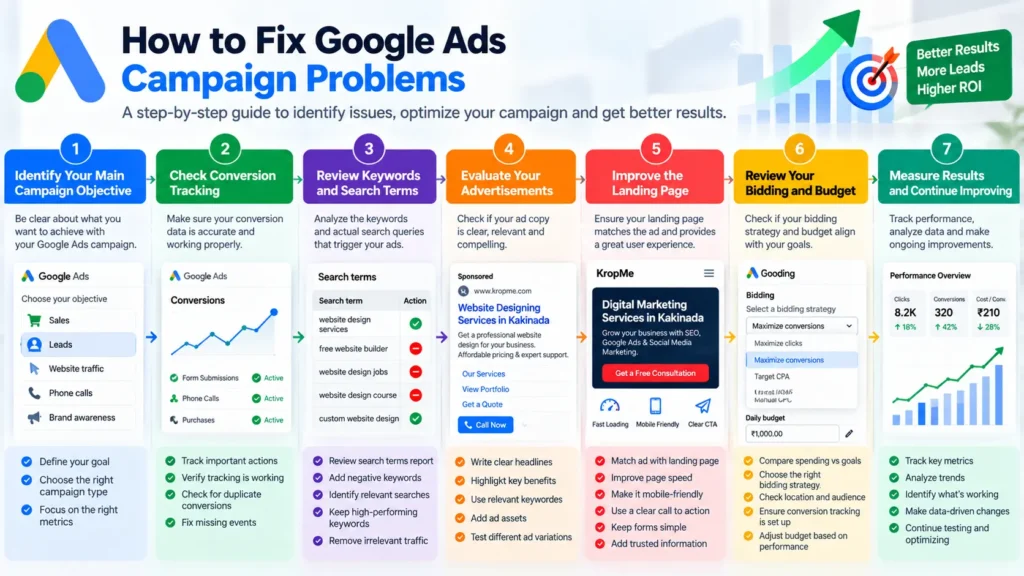
Step 1: Identify Your Main Campaign Objective
Also, start by asking what you want your campaign to achieve.
Moreover, are you trying to generate leads, sell products, receive phone calls, increase qualified website traffic, or promote brand awareness?
Your objective determines which metrics and campaign settings deserve the most attention.
For example, a lead-generation campaign should generally be evaluated by the quality and cost of enquiries rather than clicks alone.
Further, step 2: Check Conversion Tracking
Before making major optimization decisions, confirm that your conversion data is accurate.
Check whether form submissions, purchases, calls, or other important actions are recorded correctly. Also, investigate duplicate conversions, missing events, and tracking problems.
If your tracking is unreliable, the campaign data may give you a misleading picture of performance.
Step 3: Review Keywords and Search Terms
Examine the keywords that trigger your advertisements and the actual search queries reported by Google Ads.
Remove irrelevant traffic through appropriate negative keywords and identify relevant searches that may deserve more attention.
Further, do not automatically pause every keyword with a high cost or a low number of clicks. Consider its intent, conversion history, competition, and the amount of data available.
Also, step 4: Evaluate Your Advertisements
Review whether your advertisements communicate a clear benefit and match the searches you want to attract.
Make sure your headlines, descriptions, and ad assets accurately represent your offer.
Further, if visitors click but do not convert, investigate the full customer journey rather than assuming that the advertisement is the only problem.
Step 5: Improve the Landing Page
Check whether the landing page answers the visitor’s questions and makes the next step clear.
Also, look for slow loading times, confusing navigation, weak calls to action, lengthy forms, missing contact details, and mobile usability problems.
A relevant landing page can support better campaign performance by helping visitors understand your offer and complete the intended action.
Step 6: Review Your Bidding and Budget
Compare your spending with your business goals and available conversion data.
If your campaign is spending money without generating valuable outcomes, identify the underlying cause before simply increasing the budget.
Review your bidding strategy, conversion settings, target locations, keyword intent, and competition.
For conversion-focused campaigns, ensure that the account has appropriate conversion tracking and that the selected bidding strategy fits your objective.
Step 7: Measure Results and Continue Improving
Create a regular reporting routine and evaluate changes using reliable data.
Focus on meaningful business metrics such as qualified leads, cost per qualified lead, sales, conversion value, and return on advertising spend where applicable.
Not every campaign will improve immediately. Some need more data, while others require significant changes to their targeting or offer.
The most effective optimization process is continuous: identify the problem, make a justified adjustment, measure the result, and refine your strategy.
- Google Ads Optimization Checklist
- Use this checklist before launching a campaign and during your regular campaign reviews.
- Campaign setup
- Also, define a clear campaign objective.
- Moreover, select relevant keywords based on search intent.
- Review keyword match types.
- Further, add appropriate negative keywords.
- Configure location and language targeting.
- Select a suitable bidding strategy.
- Set a realistic budget.
- Verify conversion tracking.
- Advertisements and landing pages
- Write clear and relevant ad headlines.
- Create useful advertisement descriptions.
- Add relevant ad assets.
- Match advertisements to their landing pages.
- Ensure the landing page is mobile-friendly.
- Improve page speed and usability.
- Include a clear call to action.
- Also, test forms, phone numbers, and other conversion actions.
- Ongoing optimization
- Review the Search terms report.
- Check spending against the campaign budget.
- Monitor conversion rate and cost per conversion.
- Review lead quality and sales outcomes.
- Evaluate geographic performance.
- Check Quality Score components where relevant.
- Test new advertisements when appropriate.
- Avoid unnecessary changes without sufficient evidence.
- Record significant campaign adjustments.
- Review performance consistently and take action when needed.
Completing this checklist will not guarantee a particular result, but it can help you identify common problems and maintain a more disciplined approach to campaign management.
Conclusion
Avoiding the common Google Ads mistakes discussed in this guide can help you use your advertising budget more effectively and make better campaign decisions.
From selecting the right keywords and excluding irrelevant searches to improving landing pages, setting up conversion tracking, and choosing a suitable bidding strategy, every part of your campaign contributes to the overall customer experience.
Remember that successful Google Ads management is not about getting the highest number of clicks or spending more money than your competitors. It is about reaching the right people, presenting a relevant offer, and turning advertising interactions into meaningful business results.
Start by reviewing your current campaigns and identifying the two or three issues that are most likely to affect performance. Fix the most important problems first, measure the results, and continue improving based on reliable data.
If you are a small business owner, startup, or local service provider, a well-planned campaign can help you reach potential customers more effectively. However, results depend on your market, competition, offer, website experience, and campaign execution.
At KropMe, we understand the importance of connecting digital advertising with real business goals. Our digital marketing services include Google Ads management, SEO, website design, and other digital marketing solutions designed to help businesses strengthen their online presence.
If you want to improve your advertising strategy, review your current campaign setup and focus on making every click more relevant and valuable.
Ready to improve your Google Ads performance? Visit KropMe.com to explore our digital marketing services and discover how a more focused online advertising strategy can support your business growth.
Frequently Asked Questions (FAQs)
- What are the most common Google Ads mistakes?
Some of the most common Google Ads mistakes include choosing irrelevant keywords, ignoring negative keywords, using incorrect location targeting, neglecting conversion tracking, selecting an unsuitable bidding strategy, and sending visitors to poorly optimized landing pages.
These problems can reduce campaign efficiency and make it harder to achieve business goals.
- Why are my Google Ads getting clicks but no conversions?
Also, your advertisements may attract visitors who are not ready to purchase, or your landing page may not provide the information and experience they need.
Other possible causes include irrelevant keywords, a weak offer, complicated forms, slow page loading, inaccurate conversion tracking, or a mismatch between your ad and landing page.
Review the complete customer journey before deciding which change to make.
- How can I reduce wasted spending on Google Ads?
Start by reviewing your Search terms report and adding appropriate negative keywords. Refine your targeting, improve the relevance of your advertisements, and direct visitors to suitable landing pages.
You should also check conversion tracking and evaluate which keywords and campaigns generate meaningful business results.
- How much should a beginner spend on Google Ads?
There is no universal starting budget. Your budget depends on your industry, competition, keyword costs, target location, conversion goals, and available resources.
Begin with an amount you can afford to test, estimate likely costs using available Google Ads planning tools, and evaluate the quality of your results before increasing your spending.
- How often should I check my Google Ads campaigns?
Moreover, check spending and important technical issues regularly, particularly when launching a new campaign or working with a limited budget. Review performance trends and optimization opportunities on a consistent schedule that reflects your traffic and conversion volume.
Avoid making major changes simply because of a single day’s results, but address broken tracking, irrelevant traffic, and unexpected spending promptly.
- What is Quality Score in Google Ads?
Quality Score is a diagnostic score available for eligible Search keywords. It considers expected click-through rate, ad relevance, and landing page experience.
It helps advertisers identify potential areas for improvement, but it is not a direct auction-time input and does not independently determine advertising costs or position.
- Are negative keywords important for Google Ads?
Yes. Negative keywords can prevent advertisements from appearing for specified irrelevant searches, helping advertisers reduce unwanted traffic.
However, negative keywords must be selected carefully because their matching behavior differs from positive keywords. Review your search terms and exclusions regularly to avoid blocking useful traffic.
- Why is conversion tracking important in Google Ads?
Conversion tracking helps you measure valuable actions that occur after people interact with your advertisements, such as purchases, completed enquiry forms, or qualified calls.
Reliable tracking makes it easier to evaluate campaign effectiveness and supports conversion-based bidding strategies. Without it, you may struggle to distinguish campaigns that generate business results from those that generate clicks alone.
- Does a higher Google Ads budget guarantee better results?
No. Increasing your budget may provide more opportunities to reach potential customers, but it does not guarantee more sales or better returns.
Further, campaign performance also depends on keyword relevance, targeting, competition, bidding, advertisement quality, landing page experience, and conversion tracking.
Moreover, improve the campaign fundamentals before increasing spending solely to obtain more clicks.
- Can a small business succeed with Google Ads?
Yes. Small businesses can use Google Ads to reach potential customers searching for relevant products and services.
A focused strategy, suitable budget, accurate targeting, compelling advertisements, and useful landing pages can help small businesses compete for relevant searches.
Results vary by industry and market, so regular measurement and optimization are essential.
- What is the difference between clicks and conversions?
A click occurs when someone clicks your advertisement. A conversion is a valuable action that you have defined and configured for measurement, such as a purchase, lead form submission, or qualified phone call.
A campaign can generate many clicks but few conversions. For this reason, businesses should evaluate both traffic quality and meaningful outcomes.
- Should I manage Google Ads myself or hire a digital marketing agency?
Further, you can manage Google Ads yourself if you have the time to learn campaign setup, keyword research, tracking, and optimization. However, complex campaigns or competitive markets may require additional expertise.
A digital marketing agency can help with campaign planning, tracking, targeting, reporting, and ongoing optimization. Before hiring an agency, clarify its services, fees, reporting process, and performance measurement approach.
The right choice depends on your budget, business goals, and available time.